
RESPONSUM has an expression engine with a set of expressions (comparable to functions in Excel) that can be used for:
- Business rules (Open an item in the sub-module you want to apply a business rule to >> Press “Three dots” >> Select “Customize Sub-module”): Allows you to hide fields in RESPONSUM Sub-modules based on values of other fields and expressions.
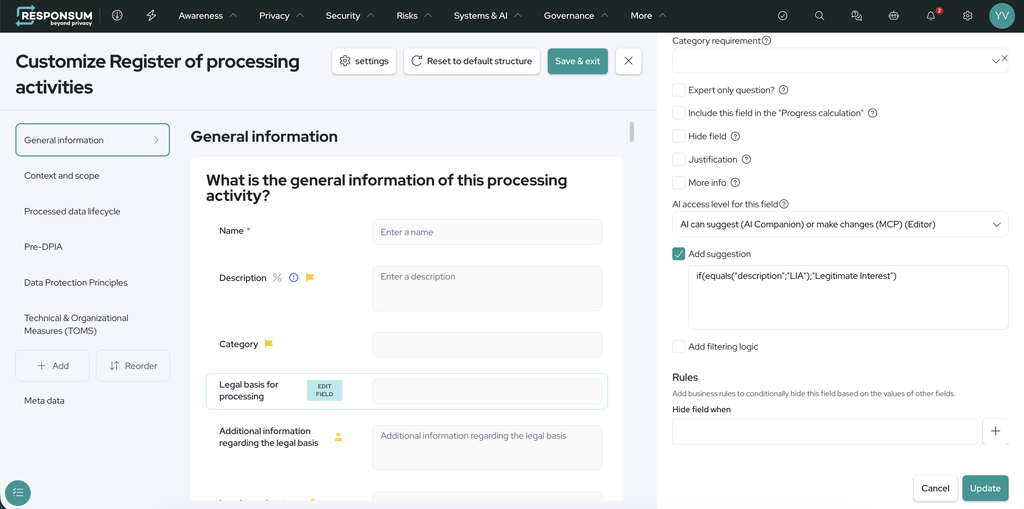
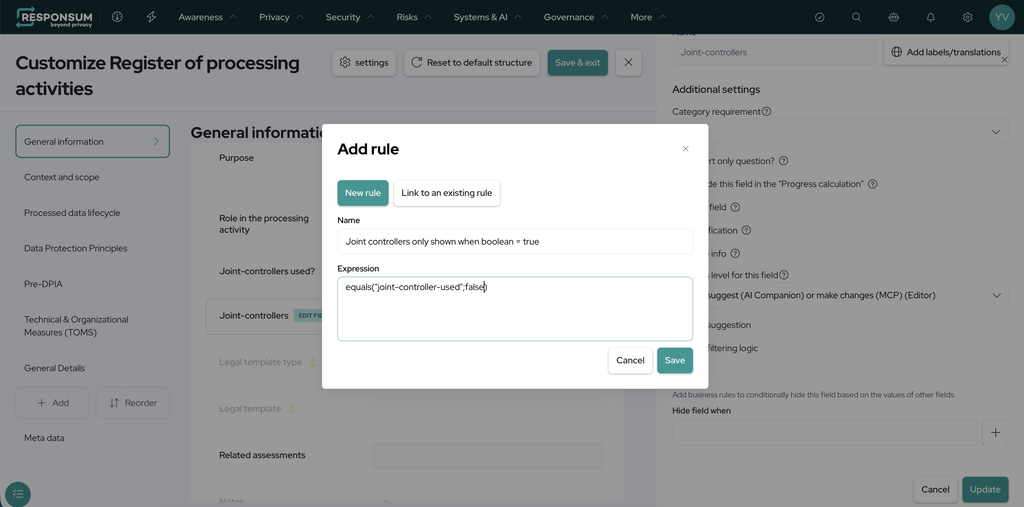
- Form/Assessments (Settings >> Setup >> Form): Allows you to add logic to fields in a form (Questionnaire) to hide them, create calculations based on inputted values in fields etc.

Usable expressions
A full list of supported expressions can be found below with usage examples.
Key Notations:
[]: represents an empty list (some options should be selected first, and then unselected. If none was previously selected, the value will be undefined)
undefined: an option is not selected (yes-no question, multiple choice question)
Empty list and undefined values won’t work in expressions, but they represent certain states of inputs.
Note about the “Use case in Responsum” column: <Field ID 1>, <Field ID 2> and <condition 1> are placeholders. Replace them with the ID of your own question or field:
In a form: the “Element ID” of the question, shown when you open the question in the form builder.
In a business rule: the “Field ID”, shown at the top of the “Edit field” panel.
Inside the brackets you can also use fixed numbers (10), fixed text in quotes (“Closed”) or other functions (count(…)).
| Function | Usage | Result | Examples | Use case in Responsum |
|---|---|---|---|---|
| Add | add(1; 2; 3; …) | The sum of all numeric values found in the inputted items. | – add(1; 2) = 3 – add(1; undefined; “foo”; 4) = 5 – add(1; “two”; [3, 4]) = 8 – add(-1; 1) = 0 – add(undefined; “text”; []) = undefined | Calculate a total score automatically. In a form, set the Default value of a Number question to: add(<Field ID 1>; <Field ID 2>): adds two answers together add(<Field ID 1>; 10): adds a fixed number to an answer add(<Field ID 1>; <Field ID 2>; <Field ID 3>; 5): adds as many answers and numbers as you need |
| Subtract | subtract(1; 2; 3; …) | The first number in the inputted items subtracted by all other numeric values found. | – subtract(1; 2) = -1 – subtract(1; undefined; “foo”; 4) = -3 – subtract(1; “text”; [3, 4]) = -6 – subtract(-1; 1) = -2 – subtract(undefined; “text”; []) = undefined | Calculate the risk that remains after security measures. In a form, set the Default value of a Number question to: subtract(<Field ID 1>; <Field ID 2>): subtracts the second answer from the first subtract(<Field ID 1>; 1): subtracts a fixed number from an answer subtract(100; <Field ID 1>): subtracts an answer from a fixed number |
| Multiply | multiply(1; 2; 3; …) | The multiplication of all numeric values found. | – multiply(1; 2) = 2 – multiply(1; undefined; “foo”; 4) = 4 – multiply(1; “two”; [3, 4]) = 12 – multiply(-1; 1) = -1 – multiply(undefined; “text”; []) = undefined | Calculate a risk score from likelihood and impact. In a form, set the Default value of a Number question to: multiply(<Field ID 1>; <Field ID 2>): multiplies two answers, for example likelihood x impact multiply(<Field ID 1>; 2): doubles an answer multiply(<Field ID 1>; <Field ID 2>; 0.5): multiplies two answers and a fixed number |
| Divide | divide(1; 2; 3; …) | The division of the first numeric value by the rest of the numeric values sequentially. | – divide(1; 2) = 0.5 – divide(1; undefined; “text”; 4) = 0.25 – divide(1; “two”; [3, 4]) = 0.083333333333 – divide(-1; 1) = -1 – divide(undefined; “fish”; []) = undefined – divide(1; 2; 3; 0) = undefined | Show the percentage of security controls in place. In a form, set the Default value of a Number question to: divide(<Field ID 1>; <Field ID 2>): divides one answer by another divide(<Field ID 1>; 2): divides an answer by a fixed number multiply(divide(<Field ID 1>; <Field ID 2>); 100): turns the result into a percentage |
| Equals | equals(item1; item2) | Returns a TRUE value if both inputted values are equal. Items are equal if they are the same type and value. NOTE: – Comparison is case-sensitive; – Arrays (Ex. Multi select dropdowns) can be compared to other arrays; – An empty array is considered equal to undefined; – An array containing only 1 item is considered the single item/value it contains. | – equals(undefined; false) ⇒ false – equals(“Cat”; “cat”) ⇒ false – equals(“cat”; “cat” ⇒ true – equals(true; 1) ⇒ false – equals(false; false) ⇒ true – equals([]; undefined) ⇒ true – equals([]; “”) ⇒ false – equals([“Sam”], [“Sam”]) ⇒ true – equals ([“Sam”]; “Sam”) ⇒ true – equals(“0”, 0) ⇒ false | Hide the “Closure date” field until the incident is closed. In the business rule of the field, set “Hide field when” to: not(equals(<Field ID 1>; “Closed”)): compares an answer with a fixed text (case-sensitive) equals(<Field ID 1>; 0): compares an answer with a number equals(<Field ID 1>; <Field ID 2>): checks if two answers are the same |
| Is Larger | islarger(1; 2) | Returns a TRUE value if 1 is larger than 2. NOTE: If the result is incomprehensible, we will return FALSE. | – isLarger(1;2) ⇒ false – isLarger(2;1) ⇒ true – isLarger(2;-1) ⇒ true – isLarger(2;”one”) ⇒ false – isLarger(2; 2) ⇒ false – isLarger(2; undefined) ⇒ false – isLarger(undefined; 2) ⇒ false – isLarger(undefined; undefined) ⇒ false | Ask for a justification only when more than 10,000 people are affected. In a form, set “Is Visible?” to Logic with: islarger(<Field ID 1>; 10000): compares an answer with a fixed number islarger(<Field ID 1>; <Field ID 2>): compares two answers islarger(count(<Field ID 1>); 3): compares the result of another function |
| Is Smaller | issmaller(1; 2) | Returns a TRUE value if 1 is smaller than 2. NOTE: If the result is incomprehensible, we will return FALSE. | – isSmaller(1;2) ⇒ true – isSmaller(2;1) ⇒ false – isSmaller(2;-1) ⇒ false – isSmaller(2;”three”) ⇒ false – isSmaller(2; 2) ⇒ false – isSmaller(2; undefined) ⇒ false – isSmaller(undefined; 2) ⇒ false – isSmaller(undefined; undefined) ⇒ false | Ask about parental consent only when users can be younger than 16. In a form, set “Is Visible?” to Logic with: issmaller(<Field ID 1>; 16): compares an answer with a fixed number issmaller(<Field ID 1>; <Field ID 2>): compares two answers issmaller(count(<Field ID 1>); 2): compares the result of another function |
| Is Larger Or Equal | islargerorequal(1; 2) | Returns a TRUE value if 1 is larger than OR equal to 2. NOTE: If the result is incomprehensible, we will return FALSE. | – isLargerOrEqual(1;2) ⇒ false – isLargerOrEqual(2;1) ⇒ true – isLargerOrEqual(2;-1) ⇒ true – isLargerOrEqual(2;”one”) ⇒ false – isLargerOrEqual(2; undefined) ⇒ false – isLargerOrEqual(undefined; 2) ⇒ false – isLargerOrEqual(undefined; undefined) ⇒ false | Show the full DPIA section when at least 2 high-risk criteria are selected. In a form, set “Is Visible?” of the section to Logic with: islargerorequal(count(<Field ID 1>); 2): at least 2 options ticked islargerorequal(<Field ID 1>; 15): an answer of 15 or more islargerorequal(<Field ID 1>; <Field ID 2>): one answer equal to or above another |
| Is Smaller Or Equal | issmallerorequal(1; 2) | Returns a TRUE value if 1 is larger than or equal to 2. NOTE: If the result is incomprehensible, we will return FALSE. | – isSmallerOrEqual(1;2) ⇒ true – isSmallerOrEqual(2;1) ⇒ false – isSmallerOrEqual(2;-1) ⇒ false – isSmallerOrEqual(2;”three”) ⇒ false – isSmallerOrEqual(2; undefined) ⇒ false – isSmallerOrEqual(undefined; 2) ⇒ false – isSmallerOrEqual(undefined; undefined) ⇒ false | Hide the “Escalation to management” field for low risks. In the business rule of the field, set “Hide field when” to: issmallerorequal(<Field ID 1>; 4): an answer of 4 or less issmallerorequal(<Field ID 1>; <Field ID 2>): one answer equal to or below another issmallerorequal(count(<Field ID 1>); 1): one option or none ticked |
| Concatenate | concatenate(item1; item2) | Will add any found TEXT in the input values together. Also works with Arrays (Ex. Multiple choice fields with multiple selected values) of texts NOTE: Will ignore anything that is not a TEXT or arrays of text (such as numbers, yes/no values, etc) | – concatenate(“John”, [“Doe”, “is”], [“a”, “legend”], [“:-)”], undefined, [], 3, true) ⇒ “JohnDoeisalegend:-)” | Create an assessment title automatically, for example “DPIA – New HR tool”. In a form, set the Default value of a Text question to: concatenate(“DPIA – “; <Field ID 1>): a fixed text followed by an answer concatenate(<Field ID 1>; ” – “; <Field ID 2>): two answers with a separator concatenate(“Risk score: “; txt(<Field ID 1>)): a text followed by a number |
| Contains | contains(item1; item2) | Returns a TRUE value if the first inputted TEXT contains the second inputted TEXT. NOTE: – This expression is NOT case-sensitive – Anything that is not “undefined” will be converted into TEXT before comparing it. | – contains(“foo”; “bar”) ⇒ false – contains(“foo”;”o”) ⇒ true – contains(undefined;undefined) ⇒ false – contains(“5”, 5) ⇒ true – contains(55, 5) ⇒ true – contains (false, “false”) ⇒ true – contains(“Sam”;”sam”) ⇒ true | Ask about marketing consent only when the purpose mentions marketing. In a form, set “Is Visible?” to Logic with: contains(<Field ID 1>; “marketing”): looks for a word in a text answer (not case-sensitive) contains(<Field ID 1>; <Field ID 2>): looks for one answer inside another or(contains(<Field ID 1>; “marketing”); contains(<Field ID 1>; “newsletter”)): looks for several words |
| If | if(condition; item1; item2) | If statement that allows you to input a condition first (Ex. Another expression). If the condition is TRUE, the first value is returned. If the condition is FALSE, the second value is returned. | – if(true;1;2) ⇒ 1 – if(false;1;2) ⇒ 2 – if(undefined;1;2) ⇒ 2 – if(“flar”;1;2) ⇒ 2 | Give a different result depending on an answer. In a form, set the Default value of a question to: if(yesno(<Field ID 1>); 10; 0): gives 10 points if the answer is Yes, otherwise 0 if(islarger(<Field ID 1>; 10); “High”; “Low”): gives a text depending on a number if(islargerorequal(<Field ID 1>; 15); “High”; if(islargerorequal(<Field ID 1>; 8); “Medium”; “Low”)): three levels in one expression |
| And | and(conditon1; condition2; …) | Returns a TRUE value if ALL conditions stated within return TRUE. | – and(true; true) ⇒ true – and(false; false) ⇒ false – and(true; false) ⇒ false – and(“foo”; “bar”) ⇒ undefined – and(true; “flar”) ⇒ undefined – and(“true”) ⇒ undefined – and(1) ⇒ undefined – and(undefined) ⇒ undefined | Show a section only when several conditions are all true. In a form, set “Is Visible?” to Logic with: and(yesno(<Field ID 1>); yesno(<Field ID 2>)): both answers are Yes and(yesno(<Field ID 1>); islarger(<Field ID 2>; 100)): an answer is Yes and a number is above 100 and(<condition 1>; <condition 2>; <condition 3>): you can check more than two conditions |
| Or | or(condition1; condition2; …) | Returns a TRUE value if ANY conditions stated within returned TRUE. | – or(true; true) ⇒ true – or(false; false) ⇒ false – or(true; false- ⇒ true – or(“foo”; “bar”) ⇒ undefined – or(true; “flar”) ⇒ undefined – or(“true”) ⇒ undefined – or(1) ⇒ undefined – or(undefined) ⇒ undefined | Show a question when at least one condition is true. In a form, set “Is Visible?” to Logic with: or(yesno(<Field ID 1>); yesno(<Field ID 2>)): at least one answer is Yes or(includes(<Field ID 1>; “Health data”); includes(<Field ID 1>; “Biometric data”)): one of two options is ticked or(<condition 1>; <condition 2>; <condition 3>): you can check more than two conditions |
| Not | not(condition) | Returns a TRUE value if the condition returns FALSE. | – not(true) ⇒ false – not(false) ⇒ true – not(undefined) ⇒ undefined – not(“flar”) ⇒ undefined – not(1) ⇒ undefined | Reverse a condition: true becomes false, false becomes true. In the business rule of a field, set “Hide field when” to: not(yesno(<Field ID 1>)): hides the field when the answer is No not(isempty(<Field ID 1>)): hides the field once another field is filled in not(includes(<Field ID 1>; “Other”)): hides the field unless “Other” is ticked |
| IsEmpty | isempty(item) | Returns a TRUE value if the item inputted is empty (Does not contain any values). NOTE: Works on TEXT and Arrays (ex. Multiple choice fields with multiple values selected). | – isEmpty(“”) ⇒ true – isEmpty([]) ⇒ true – isEmpty(undefined) ⇒ true – isEmpty([undefined; “”]) ⇒ true – isEmpty(“”;””;[];undefined;[undefined]) ⇒ true – isEmpty(“I am a mighty warrior!”) ⇒ false – isEmpty(false) ⇒ false – isEmpty(0) ⇒ false | Hide a field until another field is filled in. In the business rule of the field, set “Hide field when” to: isempty(<Field ID 1>): hides the field while the other field is empty and(isempty(<Field ID 1>); isempty(<Field ID 2>)): hides it while both fields are empty or(isempty(<Field ID 1>); isempty(<Field ID 2>)): hides it while at least one field is empty |
| Includes | includes(list; item) | Returns a TRUE value if the item is equal to one of the items in the array. NOTE: – This expression is case sensitive and will look at IDs of options (not its labels) | – includes(multi-select; “option-id”) – includes([“Option 1”]; [“Option 1”]) ⇒ true – includes(false; false) ⇒ true – includes(“Option 1”; “Option 2”) ⇒ false – includes(“Option 1”; “option 1”) ⇒ false | Show a “Please specify” question only when “Other” is selected. In a form, set “Is Visible?” to Logic with: includes(<Field ID 1>; “Other”): checks if an option is ticked (case-sensitive) includes(<Field ID 1>; <Field ID 2>): checks if the answer of one question is in the list of another includes(flatlist(“Belgium”; “France”; “Netherlands”); <Field ID 1>): checks if an answer is in a fixed list |
| Interpret Number | num(item) | Attempts to parse the inputted value as a number. NOTE: – Returns the default if it doesn’t work out; – Always returns a number: – true/false → 1 / 0 – text → will try to parse as number; – Will return 0 if unparsable or empty – undefined/null → empty | Example expression: add(num(<input>); 10) Input and result: – 3 => 13 – “3” => 13 – “” => 10 – ” ” => 10 – “/” => 10 – “a” => 10 – TRUE => 11 – FALSE => 10 | Make sure an answer is treated as a number before you compare or calculate with it. Use it inside another function: num(<Field ID 1>): turns an answer into a number islarger(num(<Field ID 1>); 250): true when the answer is above 250 add(num(<Field ID 1>); 1): adds 1 to the answer |
| Interpret Text | txt(item) | Will return a TEXT representation of an inputted item. NOTE: – Fractional number → rounded to 2 digits after comma, Boolean (true & false) → uses translations to return “Yes” (True) and “No” (False) – undefined/null → returns empty text; – Array (Ex. list of selected options) → will create a comma-separated list. | Example expression: concatenate(txt(<input>); “_test”) Input and result: – 3 => 3_test – 3.567 => 3.56_test – true => yes_test – false => no_test – “” => _test – [“Option 1”, “Option 2”, “Option 3”] => Option 1, Option 2, Option 3_test | Turn a number or a choice into text so you can combine it with other text. Use it inside concatenate: txt(<Field ID 1>): turns an answer into text concatenate(“Risk score: “; txt(<Field ID 1>)): gives for example “Risk score: 12” concatenate(txt(<Field ID 1>); ” people affected”): gives for example “500 people affected” |
| Interpret Yes/No | yesno(item) | Will return a Boolean (TRUE/FALSE) representation of an inputted item. NOTE: – Will interpret any number except 0 as “Yes” – Will interpret else “No” | – “any-text” => false – 3 -> true – 0 -> false – true -> true – false -> false – “yes” -> true – “no” -> false – “nope” -> false – “yessir” -> false | Show a follow-up question only when the previous answer is Yes. In a form, set “Is Visible?” to Logic with: yesno(<Field ID 1>): true when a Yes/No question is answered Yes yesno(<Field ID 1>): on a Number question, true when the number is not 0 not(yesno(<Field ID 1>)): true when the answer is No |
| Attribute | attribute(relation_item; “attributeName”) | Will fetch an “attribute” (Field) of an in RESPONSUM registered item in a sub-module. (Ex. The “Email” of a User Account) NOTE: – Also works with arrays (Ex. multiple choice of items). Will return an array of each object’s value. – An object’s value can be an object again. (For example, I could use attribute(processing-activity, “owner”), which would return something of the type “user”. I could then say attribute(attribute(processing-activity, “owner”), “name”) to get the name of the owner of the processing activity. | – attribute(responsible_user; “name”) ⇒ “John” – attribute(responsible_users; “email”) ⇒ [“john@responsum.eu”, “jeff@responsum.eu”] | Read a field of a linked item, for example the country of a linked vendor. In the business rule of a field, set “Hide field when” to: attribute(<Field ID 1>; “name”): gives the name of the linked item, where <Field ID 1> is the ID of the relation field not(equals(attribute(<Field ID 1>; “country”); “United States”)): hides the field unless the linked vendor is in the United States not(includes(attribute(<Field ID 1>; “country”); “United States”)): same, when several items are linked |
| Average | avg(items, more_items) | Will calculate the average of a series of provided parameters. Disregards anything that is not a number. | – avg(1) = 1 avg(1;2) = 1.5 – avg(1;2;undefined;undefined)=1.5 – avg(undefined;”fish”;true)=undefined – avg(1;2;3;[1;2;3];undefined;”duckface”;-12)=0/7=0 | Calculate the average of several scores. In a form, set the Default value of a Number question to: avg(<Field ID 1>; <Field ID 2>; <Field ID 3>): average of several answers avg(<Field ID 1>; <Field ID 2>; 5): average of answers and a fixed number round(1; avg(<Field ID 1>; <Field ID 2>)): average rounded to one decimal |
| Maximum (highest number) | max(items, more_items) | Will find the highest number in a series and skip over anything that is not a number. | – max(1) = 1 – max(undefined) = undefined – max(undefined;1) = 1 – max(1; 2; [3; 4];”text”;-6) = 4 | Keep the highest of several scores, for example as the overall risk. In a form, set the Default value of a Number question to: max(<Field ID 1>; <Field ID 2>; <Field ID 3>): the highest answer max(<Field ID 1>; 1): the answer, but never less than 1 max(multiply(<Field ID 1>; <Field ID 2>); <Field ID 3>): the highest of a calculation and an answer |
| Minimum (lowest number) | min(items, more_items) | Will find the lowest number in a series and skip over anything that is not a number. | – min(1) = 1 – min(undefined;true;”text”) = undefined – min(undefined;1) = 1 – min(1; 2; [3; 4];”text”;-6) = -6 | Keep the lowest of several scores, for example the weakest control. In a form, set the Default value of a Number question to: min(<Field ID 1>; <Field ID 2>; <Field ID 3>): the lowest answer min(<Field ID 1>; 100): the answer, but never more than 100 min(add(<Field ID 1>; <Field ID 2>); 10): a total, capped at 10 |
| Count | count(items, more_items) | Will count items that are defined within the parameters. This includes options selected in multiple choice questions and number of items in a repeatable section. | Useful for counting ex. the number of selected items in a dropdown, or the number of objects who have a certain attribute defined in a relation field (in combination with attribute) – count(“my_option_field”) → 3 (assuming 3 options are selected in the field with the id “my_option_field”) – count([50, 3]) → 2 – count(undefined) → 0 count([“foo”, undefined]) → 1 – count(50) → 1 – count(false) → 1 – count(1, 2, undefined, [3, 4, undefined], “two apples”) → 5 – count(section_id) → 1 (assuming a non-repeating section) | Count how many options are ticked or how many entries a repeatable section has. In a form, set “Is Visible?” to Logic with: count(<Field ID 1>): number of options ticked in a multiple choice question count(<Field ID 2>): number of entries in a repeatable section, where <Field ID 2> is the ID of the section islarger(count(<Field ID 2>); 5): true when there are more than 5 entries |
| Rounding | roundup(decimals, numbers) rounddown(decimals, numbers) round(decimals, numbers) | Will round the number (up, down, or nearest), up to a number of decimals as specified in the first argument. Disregards anything that is not a number. | Round up: – roundup(0; 2) = 2 – roundup(0; 2.00001) = 3 roundup(0; [2.1; 3.1; 4]; 5; “text”; 99) = [3, 4, 4, 5, 99] – roundup(0; “text”) = undefined – roundup(“text”, 1) = undefined – roundup(2; 5,7777) = 5,78 Round down: – rounddown(2; 5,7777) = 5,77 Round (Nearest): – round(0; 5.1) = 5 – round(0; 5.6) = 6 | Round a number to the number of decimals you choose. The first value is the number of decimals. In a form, set the Default value of a Number question to: round(0; <Field ID 1>): rounds an answer to a whole number round(2; divide(<Field ID 1>; <Field ID 2>)): rounds a calculation to 2 decimals roundup(0; <Field ID 1>) or rounddown(0; <Field ID 1>): always rounds up or always rounds down |
| Make a list | flatlist(item_1, item_2, item_3) | Will combine all input into a list. | – flatlist(1; 2; 3; – flatlist(4; 5;flatlist(6))) = [1, 2, 3, 4, 5, 6] – flatlist(undefined; 1; “flar”) = [undefined, 1, “flar”] | Combine several answers or values into one list. Use it inside another function, for example includes: flatlist(<Field ID 1>; <Field ID 2>): combines the answers of two questions flatlist(“Health data”; “Biometric data”): creates a fixed list includes(flatlist(<Field ID 1>; <Field ID 2>); “Health data”): checks if “Health data” is ticked in either question |
As this can add major complexity to your forms/questionnaires, if you need any assistance, please reach out to us via support@responsum.eu.
We have consultants available to guide you through or take over this task fully so you get to the behavior you expect for your form/questionnaire.